Try Hairstyles-AI Change Color
- 4.0
- Rating
- 500.00K
- Installs
- Free
- Price
 Analysis by App-foxy
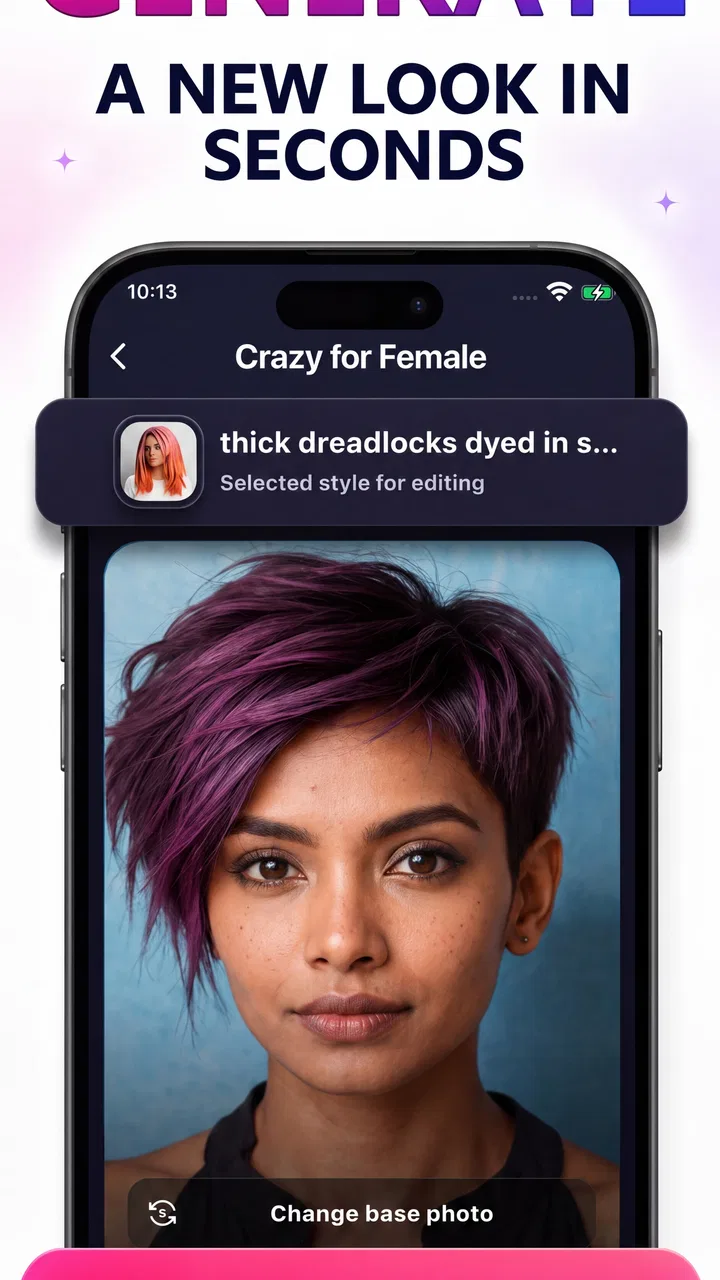
I tried Try Hairstyles-AI Change Color as a beauty app for experimenting with haircuts, hair colors, makeup looks, and salon-style makeovers. My first impression was that it is aimed at quick visual exploration rather than detailed professional consultation. You choose a look, test an idea, and decide whether the result gives you enough inspiration to take to a stylist or recreate with makeup.
That distinction matters. A virtual makeover can be genuinely useful when you are unsure whether to try a shorter cut, a different shade, or a more noticeable makeup style. It is not the same as seeing a precise preview of your future appearance. In my experience, the best way to use this app is as a playful decision aid: narrow down possibilities, compare moods, and save a few ideas before making a real change.
What the app feels like in everyday use
The app comes from Bizo Mobile and sits firmly in the beauty category. It is free to install, rated for Everyone, and works on devices running Android 6.0 or later. Its current version is 1.0.23, while its presence on the platform is reflected by over 500 thousand installs and an average rating of 3.9 from around 3.4 thousand ratings.
You May Also Like

 Blood Strike: 2.5 Anniversary
Blood Strike’s Loadouts Turn Every Drop Into a Tactical Gamble
A close look at Blood Strike’s custom loadouts: how fast access to signature weapons reshapes its battle royale rhythm, rewards preparation, and narrows the gap between fights.

 Pandora - Music & Podcasts
Pandora’s Music Is Easy to Start, but Harder to Recover
Pandora’s strength is its low-effort path from a seed to a station. Its weak spot is how much confidence it asks you to place in connection, setup, and quiet recovery.

 8 Ball Pool
 Is Built on Rivalries, Rematches, and Routine
A close look at the rivalries, rematches, shared routines, and unanswered safety questions that turn a quick pool match into a persistent mobile community.

 Samsung Music
’s Quiet Strength Is Playing What You Already Own
Its reach comes less from spectacle than from dependable access to a personal library. That simplicity is both the app’s strongest retention engine and its ceiling.

 AccuWeather: Weather Radar
AccuWeather Review: A Quick, Clear Forecast for Everyday Decisions
For everyday plans, the best forecast is the one you can understand quickly. AccuWeather makes rain timing, radar, and local conditions easy to act on, with a few trade-offs.

 Hill Climb Racing
Why Hill Climb Racing Still Turns Crashes Into One More Run
A tiny car, a bumpy hill and one more upgrade: Hill Climb Racing keeps resurfacing because its simple chaos makes every near-miss feel personal.
More From Our News Desk
View All News


Those figures suggest a reasonably broad audience, but they also set realistic expectations. This is not an exclusive professional styling suite that assumes you already know exactly what you want. It is more approachable for someone browsing ideas on a phone, especially before a haircut appointment, a party, a holiday, or a simple change of routine.
I found the concept easiest to understand when treating each result as a visual suggestion. Hair color can look attractive on screen but behave differently under indoor lighting, daylight, or salon lighting. The same applies to a virtual cut: the shape may help you communicate a direction, yet the final result depends on hair texture, density, length, and the stylist’s technique.
A practical workflow before making a real change
A useful routine is to begin with a photo that shows your face clearly and keeps the hair reasonably visible. Avoid judging a look from a rushed selfie taken in dim light. If the starting image is unclear, the makeover can become harder to interpret, and you may blame the style for a problem caused by the source photo.
I would test broad changes first rather than immediately chasing tiny details. Compare a warmer and cooler color, then a shorter and longer silhouette, and only afterward focus on makeup. This creates a more useful shortlist. Instead of collecting dozens of nearly identical results, you can identify two or three directions that genuinely feel different.
One non-obvious advantage of this order is that it separates the decisions. Hair shape changes the balance of the face, while makeup can make a look seem more dramatic even when the hairstyle itself is not the main reason you like it. Testing them in stages helps you understand what is actually working for you.
Where it helps more than a salon conversation alone
Many people know they want “something different” but cannot describe it. A stylist may ask whether you prefer a bob, layers, bangs, or a certain color family, and vague answers can make that conversation difficult. A virtual makeover gives you a visual reference, even if the preview is not exact.
For example, imagine preparing for a weekend event and considering a copper tone with a more noticeable makeup look. Rather than arriving with only a vague idea, you can use the app to decide whether the overall impression feels soft, bold, or too far from your usual style. You can then show the general direction to a professional and ask what is realistic for your hair.
That is where I think the app has its strongest everyday value: it turns an abstract impulse into something you can discuss. It does not replace a consultation, but it can make the consultation less awkward and more productive.
How the visual results should be interpreted
I would be careful with color accuracy. Screen brightness, display settings, existing hair color, and the condition of your hair all affect the final result. A virtual shade that looks like a soft brown may translate differently if your hair needs lightening first. A vivid color may also require maintenance that the image does not communicate.
The same caution applies to haircut previews. A picture cannot fully show how a style moves, how long it takes to dry, or whether it will sit well without styling products. If you have curly, coily, very fine, or particularly thick hair, use the preview as a conversation starter rather than a promise.
My best tip is to compare the app’s result with real reference photos from people whose hair texture and face shape are closer to yours. That extra step prevents a common mistake: choosing a style because it looks good in a polished preview while ignoring the practical work needed to maintain it.
Trust, controls, and making careful choices
Because a beauty makeover app normally works around personal images, I pay attention to trust before spending much time with it. The important question is not only whether the result looks convincing, but also whether I understand what I am choosing when I add a photo, continue through a screen, or consider an optional purchase.
With this app, I recommend reading each visible prompt instead of tapping through automatically. Pay attention to requests involving photos, storage, sharing, notifications, or account access. I do not treat a makeover result as a reason to grant broader access than necessary. If a choice is optional, I prefer to leave it off until I know why I need it.
This is especially important when using a photo of another person. Even for a harmless style experiment, I would ask permission before importing someone else’s image. A friend’s picture, a child’s picture, or a client’s picture deserves more care than a casual selfie because the person in the image may not expect it to be processed or retained.
What I check before uploading a personal photo
Before using a face photo, I make a quick decision about the image itself. I avoid pictures that reveal a home address, workplace badge, school uniform, documents, or other background details. A tightly cropped image is usually a better choice for a simple hairstyle experiment because it reduces unrelated information in the frame.
I also avoid using the app for sensitive identity decisions. A virtual look can be fun, but it should not become a substitute for careful thought about a major appearance change, a medical concern, or a professional requirement. If the question involves scalp health, hair loss, allergies, or skin irritation, a qualified professional is more appropriate than a visual filter.
Another useful habit is to remove test images from the device’s gallery later if I no longer need them. That does not answer every question about app handling, but it reduces the number of copies sitting in ordinary places on the phone. I also avoid sharing a result publicly until I am comfortable with the image and any context visible around it.
Free access and the point where costs matter
The app is free, but optional in-app purchases are listed at $5.99 per item. That makes it important to distinguish between trying the basic experience and committing to paid extras. I would explore the available looks first and only consider a purchase after deciding that the additional content or function genuinely improves my workflow.
When a purchase screen appears, I look for the exact item, whether it is a one-time payment, and which account will be charged. I do not assume that a free installation means every style or tool is included. I also would not buy something simply because a preview is attractive; the real test is whether I will use the result beyond one quick experiment.
For a casual user who wants one haircut idea before an appointment, a paid item may not be worthwhile. For someone who regularly creates mood boards for beauty looks, the calculation can be different. The sensible approach is to start small and judge the value by repeated use rather than by curiosity.
How much control the user really has
The most useful form of control here is choosing how far to go. You can keep the app as a private experiment, use a neutral image, avoid unnecessary account steps, and decide not to purchase anything. Those choices make the experience feel less risky than treating every prompt as mandatory.
I also like to keep a simple record of what I actually wanted from the session. Was I comparing colors, checking whether a shorter cut suited my face, or looking for makeup inspiration? Having one goal reduces aimless browsing and makes it easier to stop when the app has done its job.
If a result feels strangely convincing, I deliberately pause before treating it as a recommendation. I check it at a different screen brightness, compare it with ordinary photos, and ask whether I would still like the idea without the novelty of the transformation. That small reality check is one of the best ways to preserve personal judgment.
Who should use it, and who should skip it
I think this app is a good match for people who enjoy experimenting visually, feel uncertain about describing a desired haircut, or want a quick way to compare beauty moods. It can also help someone prepare for a salon visit by turning “I want a change” into a more concrete discussion.
I would be more cautious if you need highly accurate color matching, professional portfolio tools, detailed hair-texture simulation, or a guaranteed preview of a technical cut. In those situations, a stylist’s consultation, a specialized hair-color service, or a tool built around professional editing may be a better choice.
It is also not the right tool for diagnosing appearance-related problems. If your interest comes from sudden hair changes, scalp discomfort, or a skin reaction, visual experimentation is beside the point. The app can suggest a look, but it cannot assess the underlying issue.
Compared with trying hairstyles through ordinary photo-editing tools, this app is more focused on beauty experimentation and requires less manual work. Compared with consulting a salon directly, it is faster and more private, but much less dependable for judging maintenance, texture, and real-world feasibility. I see it as the middle option: more purposeful than a generic filter, less authoritative than professional advice.
My final view after using it
Try Hairstyles-AI Change Color is most valuable when you use it to ask better questions, not to receive a final answer. It can help you discover whether you are drawn to a warmer shade, a shorter outline, or a stronger makeup direction. Its practical strength is reducing the blank-page problem before you make a real appointment or buy beauty products.
The trade-off is that a polished preview can encourage overconfidence. Hair behavior, lighting, upkeep, and personal comfort still matter, and the app cannot remove those variables. I would also keep a close eye on visible choices around photos, access, account steps, and purchases, particularly when using images that include anyone besides me.
For a free beauty app from Bizo Mobile, it offers a straightforward way to explore hairstyles and makeup looks without immediately committing to a real change. The Everyone age rating makes it broadly approachable, while the optional $5.99 purchases mean I would review each paid option carefully rather than assuming the full experience is included.
My recommendation is cautious but positive: try it when you want inspiration, use a clean and carefully chosen photo, compare results with real references, and bring your favorite direction to a professional before making a major change. If you want a private, low-pressure starting point, it is worth exploring. If you need technical accuracy or expert hair advice, skip the makeover preview and go straight to a qualified stylist.
FAQs for Try Hairstyles-AI Change Color
01What is Try Hairstyles-AI Change Color and how does it work?
Try Hairstyles-AI Change Color is an innovative app that uses artificial intelligence to help users experiment with different hairstyles and hair colors. By uploading a photo, the app allows users to virtually try on a wide range of styles and colors. This helps in visualizing potential changes before committing to a new look.
02Is Try Hairstyles-AI Change Color free to use, or are there in-app purchases?
The app offers a free version with basic features, allowing users to try out a limited number of hairstyles and colors. However, for a more extensive range of styles, colors, and advanced features, users can purchase a premium subscription or individual features through in-app purchases.
03What devices are compatible with Try Hairstyles-AI Change Color?
Try Hairstyles-AI Change Color is compatible with both Android and iOS devices. It requires Android 6.0 or later and iOS 11.0 or later. The app is optimized for smartphones and tablets, ensuring a smooth user experience across different devices.
04How accurate are the hairstyle and color simulations in Try Hairstyles-AI Change Color?
The app utilizes advanced AI technology to provide realistic simulations of hairstyles and colors. While the visualizations are highly accurate, it’s important to note that the results may vary slightly in real life due to individual hair texture and lighting conditions when taking the photo.
05Can I save and share the hairstyle changes I make in Try Hairstyles-AI Change Color?
Yes, users can easily save their favorite looks to their device’s gallery. Additionally, the app allows for easy sharing of images directly to social media platforms or via messaging apps, making it simple to get feedback from friends and family.
Pros
- Realistic hair color previews.
- Wide range of hairstyle options.
- User-friendly interface.
- Quick and easy to use.
- No in-app purchases required.
Cons
- Limited free color choices.
- Occasional app crashes.
- Requires internet for best results.
- Ads can be intrusive.
- Limited style customization options.

Try Hairstyles-AI Change Color
Gallery